Ticket to invoice
Five stages, arithmetic visible at every one
The page walks the whole loop and shows the sum at each stage, so you can check our maths before you trust it with your money.
Follow one ticket
Interactive simulation with synthetic data. No upload, extraction service, invoice or payment is sent. Try the actual workflow during your trial.
- 1. Captured
- 2. Reviewed
- 3. Charge created
- 4. Draft invoice
- 5. Issued
Captured
Synthetic ticket ST-1042: net weight 6,500 lb. Capture is saved on the device; the office cannot process it until it syncs.
The working ticket and invoice screens
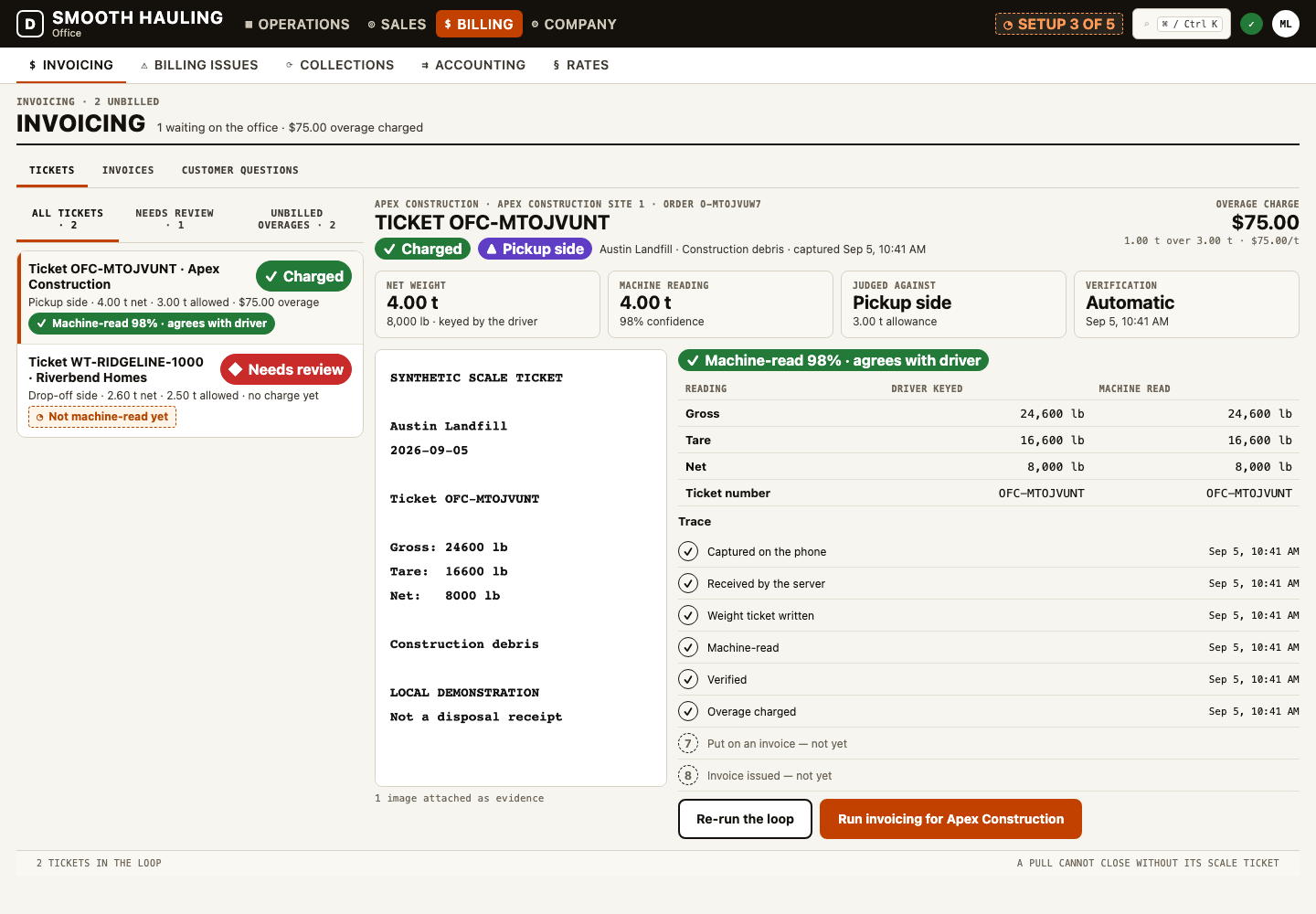
Actual local product captures from a tested order-to-invoice journey. This separate synthetic example uses 4 tons, a 3-ton allowance and $75 per excess ton.

How it works · 01
Capture the fact before calculating the charge
The driver’s ticket photo establishes a source to review. It does not make a machine reading correct. Check the ticket number, net weight, units, disposal site and the order side that generated the load. An exchange can have different terms on each side; applying the new delivery’s allowance to the collected container changes the bill.
Smooth Hauling separates capture, parsing, review, charge creation and invoicing. The configured extraction provider affects automated reading; unreadable or uncertain tickets need review. Offline capture waits for reconnection before the office can process it. Same-day billing therefore depends on sync, usable terms and review, rather than a guarantee attached to every photograph.
How it works · 02
Keep the explanation with the invoice line
For a weight overage, the useful explanation is the measured quantity, included allowance, billable excess and rate. The result should point back to the evidence the office used. In the example, 3.25 US short tons minus 2 included tons leaves 1.25 billable tons; at $80 per ton, that is a $100 overage before any tax.
Before issuing, confirm that the charge belongs to this order and has not already been invoiced. A disputed line needs a recorded reason and response. Accepting a dispute is a decision about the complaint; any credit or refund must also be recorded through its financial workflow. The interactive example demonstrates those distinctions with synthetic data.
What it won’t do
A machine reading is never billed on its own. The two numbers are confirmed against the photo by a person, and an unreadable or uncertain ticket waits in the review queue rather than becoming a charge.
Check it in your trial
- Review the source ticket and its units.
- Use the collected container’s terms for a pickup.
- Inspect the quantity × rate explanation before issue.
- Keep a dispute response separate from credit or refund processing.
Continue your evaluation
Put your own day through it
Thirty days free, no card, no sales call. Start with a small sample; check the records, the driver flow and the bill before moving the operation.